# Calcul besoin net (CBN):

Le **Calcul des Besoins Nets (CBN)** est une fonction essentielle dans la gestion de production. Il permet de déterminer, à partir des **demandes brutes** (commandes clients, bon de commande interne), les **quantités Nécessaires** de composants à produire ( Ordre de fabrication prévisionnel) et la les **quantités à commander** des matières premières (Bon de commande fournisseur Prévisionnel).  
Ce calcul prend en compte les **stocks disponibles**, le **stock de sécurité**, les **délais de livraison prévus** ainsi que le **calendrier de production** et les **temps d'exécution des opérations** .  
L’objectif principal du CBN est de générer les ordres de fabrication prévisionnel en estiment la **date début** et la **date fin production** , bon de transfert inter dépôt prévisionnel et les bon de commande fournisseur prévisionnel .

### **<span style="color: rgb(0, 0, 0);"><span style="mso-spacerun: yes;">1.</span>Diffèrent méthode de calcul CBN </span>**

***<span style="mso-bidi-font-family: Calibri; mso-bidi-theme-font: minor-latin;"><span style="mso-list: Ignore;">A-<span style="font: 7.0pt 'Times New Roman';"> </span></span></span>******<u>Grouper par variant </u>***

<span style="mso-ascii-font-family: Calibri; mso-fareast-font-family: Calibri; mso-hansi-font-family: Calibri; mso-bidi-font-family: Calibri;"><span style="mso-list: Ignore;">-<span style="font: 7.0pt 'Times New Roman';"> </span></span></span>Un OFP groupe tous les articles qui présentent la même valeur variant, indépendamment de l’article Produit fini (un OF / valeur variant)

***<span style="mso-bidi-font-family: Calibri; mso-bidi-theme-font: minor-latin;"><span style="mso-list: Ignore;">B-<span style="font: 7.0pt 'Times New Roman';"> </span></span></span>******<u>Grouper par article</u>***

<span style="mso-ascii-font-family: Calibri; mso-fareast-font-family: Calibri; mso-hansi-font-family: Calibri; mso-bidi-font-family: Calibri;"><span style="mso-list: Ignore;">-<span style="font: 7.0pt 'Times New Roman';"> </span></span></span>Un OFP groupe les quantités du même article indépendamment du BCC<span style="mso-spacerun: yes;"> </span>

***<span style="mso-bidi-font-family: Calibri; mso-bidi-theme-font: minor-latin;"><span style="mso-list: Ignore;">C-<span style="font: 7.0pt 'Times New Roman';"> </span></span></span>******<u>Aucun groupage </u>***

<span style="mso-ascii-font-family: Calibri; mso-fareast-font-family: Calibri; mso-hansi-font-family: Calibri; mso-bidi-font-family: Calibri;"><span style="mso-list: Ignore;">-<span style="font: 7.0pt 'Times New Roman';"> </span></span></span>Un OFP présente un seul article pour un seul BCC

### <span style="color: rgb(0, 0, 0);">**2. calcul CBN par article** </span>

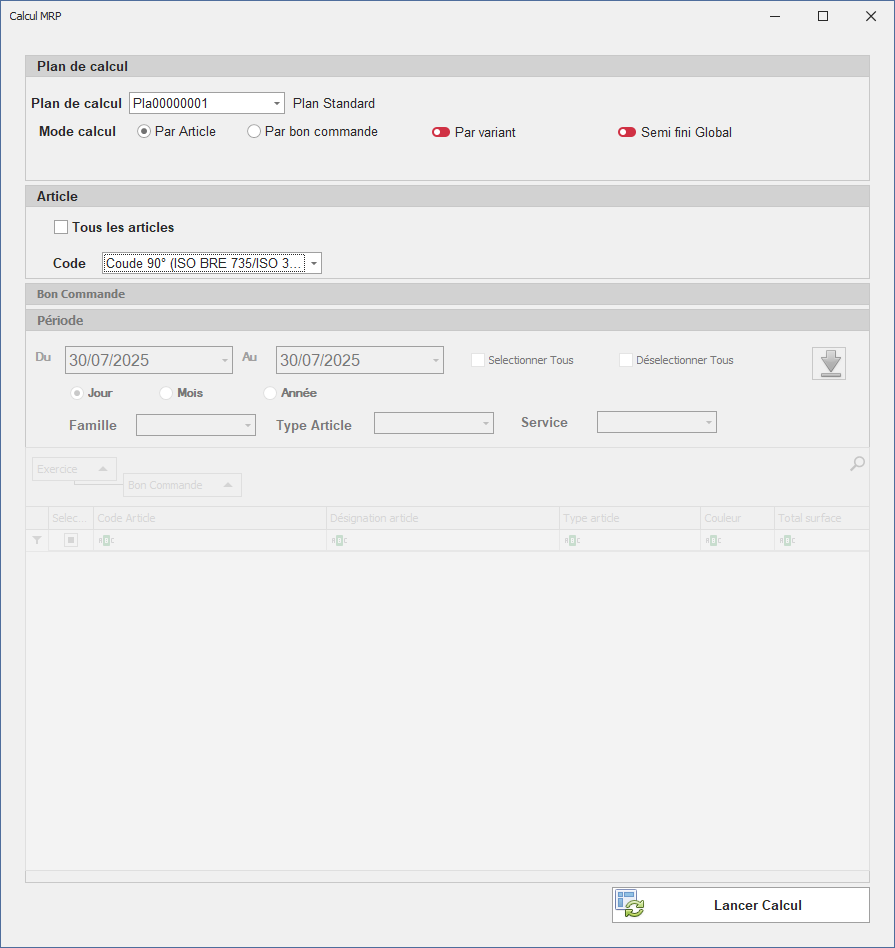
<span style="font-family: Symbol; mso-ascii-font-family: 'Times New Roman';">·</span><span style="mso-spacerun: yes;"> </span>**Plan de calcul** : liste déroulante pour choisir le plan MRP (ex : `<span style="font-size: 10.0pt; mso-fareast-font-family: 'Times New Roman'; mso-fareast-theme-font: major-fareast;">Pla00000001</span>`)

<span style="font-family: Symbol; mso-ascii-font-family: 'Times New Roman';">·</span><span style="mso-spacerun: yes;"> </span>**Plan Standard** : affichage informatif du nom du plan sélectionné

**<span style="font-size: 13.5pt; font-family: 'Times New Roman',serif; mso-fareast-font-family: 'Times New Roman'; mso-fareast-language: FR;">Mode de calcul :</span>**

- **<span style="font-size: 12.0pt; font-family: 'Times New Roman',serif; mso-fareast-font-family: 'Times New Roman'; mso-fareast-language: FR;">Par Article </span>**<span style="font-size: 12.0pt; font-family: 'Segoe UI Symbol',sans-serif; mso-fareast-font-family: 'Times New Roman'; mso-bidi-font-family: 'Segoe UI Symbol'; mso-fareast-language: FR;">✅</span><span style="font-size: 12.0pt; font-family: 'Times New Roman',serif; mso-fareast-font-family: 'Times New Roman'; mso-fareast-language: FR;"> :</span>

**<span style="font-size: 12.0pt; font-family: 'Times New Roman',serif; mso-fareast-font-family: 'Times New Roman'; mso-fareast-language: FR;"><span style="mso-spacerun: yes;"> </span></span>**<span style="font-family: 'Segoe UI Symbol',sans-serif; mso-bidi-font-family: 'Segoe UI Symbol';">✅</span> **<span style="font-family: 'Calibri',sans-serif; mso-ascii-theme-font: minor-latin; mso-hansi-theme-font: minor-latin; mso-bidi-font-family: 'Times New Roman'; mso-bidi-theme-font: minor-bidi;">Tous les articles</span>** *<span style="font-family: 'Calibri',sans-serif; mso-ascii-theme-font: minor-latin; mso-hansi-theme-font: minor-latin; mso-bidi-font-family: 'Times New Roman'; mso-bidi-theme-font: minor-bidi;">(case à cocher)</span>* : inclut tous les articles dans le calcul**<span style="font-size: 12.0pt; font-family: 'Times New Roman',serif; mso-fareast-font-family: 'Times New Roman'; mso-fareast-language: FR;"><span style="mso-spacerun: yes;"> </span></span>**

<span style="font-size: 11.0pt; line-height: 107%; font-family: 'Calibri',sans-serif; mso-ascii-theme-font: minor-latin; mso-fareast-font-family: Calibri; mso-fareast-theme-font: minor-latin; mso-hansi-theme-font: minor-latin; mso-bidi-font-family: 'Times New Roman'; mso-bidi-theme-font: minor-bidi; mso-ansi-language: FR; mso-fareast-language: EN-US; mso-bidi-language: AR-SA;"><span style="mso-spacerun: yes;"> </span></span><span style="font-size: 11.0pt; line-height: 107%; font-family: 'Segoe UI Symbol',sans-serif; mso-fareast-font-family: Calibri; mso-fareast-theme-font: minor-latin; mso-bidi-font-family: 'Segoe UI Symbol'; mso-ansi-language: FR; mso-fareast-language: EN-US; mso-bidi-language: AR-SA;">✅</span><span style="font-size: 11.0pt; line-height: 107%; font-family: 'Calibri',sans-serif; mso-ascii-theme-font: minor-latin; mso-fareast-font-family: Calibri; mso-fareast-theme-font: minor-latin; mso-hansi-theme-font: minor-latin; mso-bidi-font-family: 'Times New Roman'; mso-bidi-theme-font: minor-bidi; mso-ansi-language: FR; mso-fareast-language: EN-US; mso-bidi-language: AR-SA;"> <span style="mso-spacerun: yes;"> </span>**<span style="font-family: 'Calibri',sans-serif; mso-ascii-theme-font: minor-latin; mso-hansi-theme-font: minor-latin; mso-bidi-font-family: 'Times New Roman'; mso-bidi-theme-font: minor-bidi;">Code</span>** : champ de sélection d’un article spécifique<span style="mso-spacerun: yes;"> </span>: Dans ce cas, on va lancer le calcul CBN pour tous les bons de commande non transformés contenant cet article</span>

[![interface calcul cbn.PNG](https://help.asmpos.com/uploads/images/gallery/2025-07/scaled-1680-/interface-calcul-cbn.PNG)](https://help.asmpos.com/uploads/images/gallery/2025-07/interface-calcul-cbn.PNG)

### **<span style="color: rgb(0, 0, 0);">3.Interface calcul CBN par bon commande </span>**

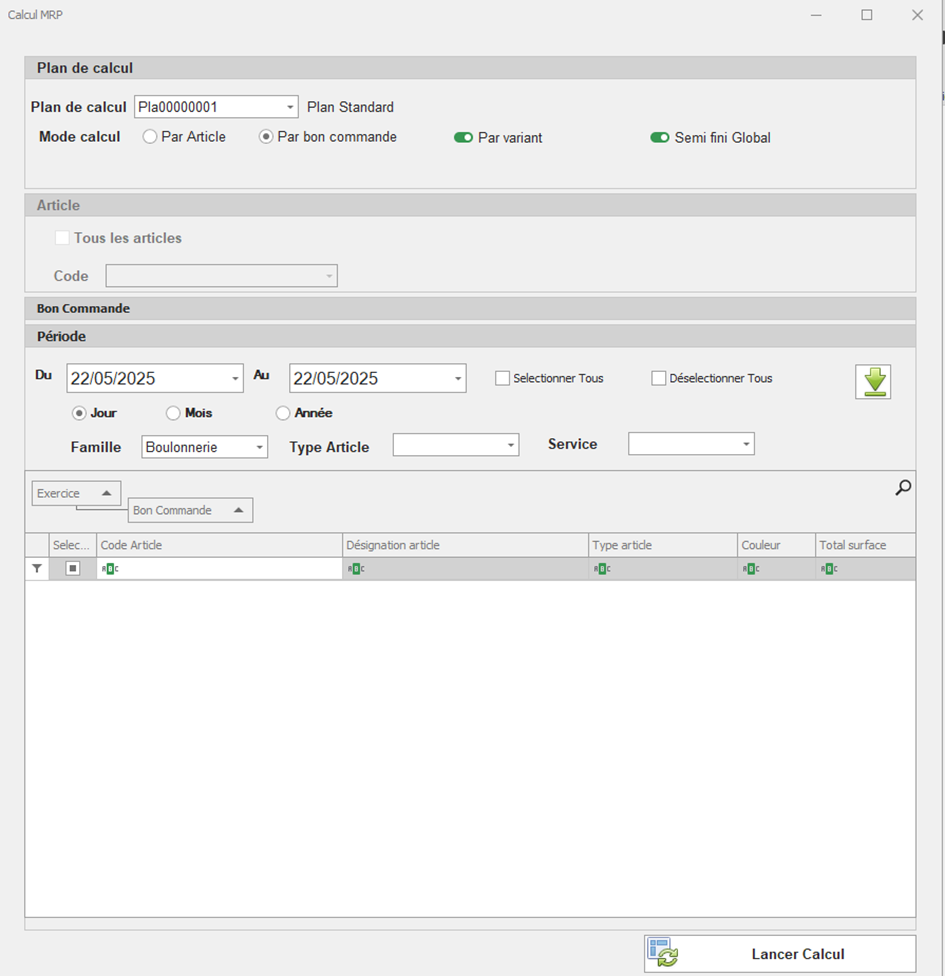
<span style="font-size: 12.0pt; font-family: Symbol; mso-ascii-font-family: 'Times New Roman'; mso-fareast-font-family: 'Times New Roman'; mso-bidi-font-family: 'Times New Roman'; mso-fareast-language: FR;">·</span><span style="font-size: 12.0pt; font-family: 'Times New Roman',serif; mso-fareast-font-family: 'Times New Roman'; mso-fareast-language: FR;"><span style="mso-spacerun: yes;"> </span>**Du / Au** :  
Période sur laquelle on veut rechercher les bons de commande actifs/non transformés.</span>

<span style="font-size: 12.0pt; font-family: Symbol; mso-ascii-font-family: 'Times New Roman'; mso-fareast-font-family: 'Times New Roman'; mso-bidi-font-family: 'Times New Roman'; mso-fareast-language: FR;">·</span><span style="font-size: 12.0pt; font-family: 'Times New Roman',serif; mso-fareast-font-family: 'Times New Roman'; mso-fareast-language: FR;"><span style="mso-spacerun: yes;"> </span>**Granularité de temps** (Jour / Mois / Année) :  
**Année** est sélectionnée – le filtrage temporel se fait par année.</span>

<span style="font-size: 12.0pt; font-family: Symbol; mso-ascii-font-family: 'Times New Roman'; mso-fareast-font-family: 'Times New Roman'; mso-bidi-font-family: 'Times New Roman'; mso-fareast-language: FR;">·</span><span style="font-size: 12.0pt; font-family: 'Times New Roman',serif; mso-fareast-font-family: 'Times New Roman'; mso-fareast-language: FR;"><span style="mso-spacerun: yes;"> </span>**Famille, Type Article, Service** :  
</span><span style="mso-spacerun: yes;"> </span>Ce sont des champs de filtrage

<span style="font-size: 12.0pt; font-family: 'Times New Roman',serif; mso-fareast-font-family: 'Times New Roman'; mso-fareast-language: FR;">Affiche la bonne commande correspondante aux filtres :</span>

- **<span style="font-size: 12.0pt; font-family: 'Times New Roman',serif; mso-fareast-font-family: 'Times New Roman'; mso-fareast-language: FR;">Exercice </span>**
- **<span style="font-size: 12.0pt; font-family: 'Times New Roman',serif; mso-fareast-font-family: 'Times New Roman'; mso-fareast-language: FR;">Bon de Commande </span>**

<span style="font-size: 10.0pt; mso-bidi-font-size: 12.0pt; font-family: 'Courier New'; mso-fareast-font-family: 'Courier New'; mso-fareast-language: FR;"><span style="mso-list: Ignore;">o<span style="font: 7.0pt 'Times New Roman';"> </span></span></span>**<span style="font-size: 12.0pt; font-family: 'Times New Roman',serif; mso-fareast-font-family: 'Times New Roman'; mso-fareast-language: FR;">Article </span>**

<span style="font-size: 10.0pt; mso-bidi-font-size: 12.0pt; font-family: 'Courier New'; mso-fareast-font-family: 'Courier New'; mso-fareast-language: FR;"><span style="mso-list: Ignore;">o<span style="font: 7.0pt 'Times New Roman';"> </span></span></span>**<span style="font-size: 12.0pt; font-family: 'Times New Roman',serif; mso-fareast-font-family: 'Times New Roman'; mso-fareast-language: FR;">Désignation</span>**

<span style="font-size: 10.0pt; mso-bidi-font-size: 12.0pt; font-family: 'Courier New'; mso-fareast-font-family: 'Courier New'; mso-fareast-language: FR;"><span style="mso-list: Ignore;">o<span style="font: 7.0pt 'Times New Roman';"> </span></span></span><span style="font-size: 12.0pt; font-family: 'Times New Roman',serif; mso-fareast-font-family: 'Times New Roman'; mso-fareast-language: FR;">Les colonnes **Type article ,Couleur, Total surface**</span>

[![image.png](https://help.asmpos.com/uploads/images/gallery/2025-06/scaled-1680-/9SWimage.png)](https://help.asmpos.com/uploads/images/gallery/2025-06/9SWimage.png)

### <span style="color: rgb(0, 0, 0);">**4.Génération Bon de commande Production**</span>

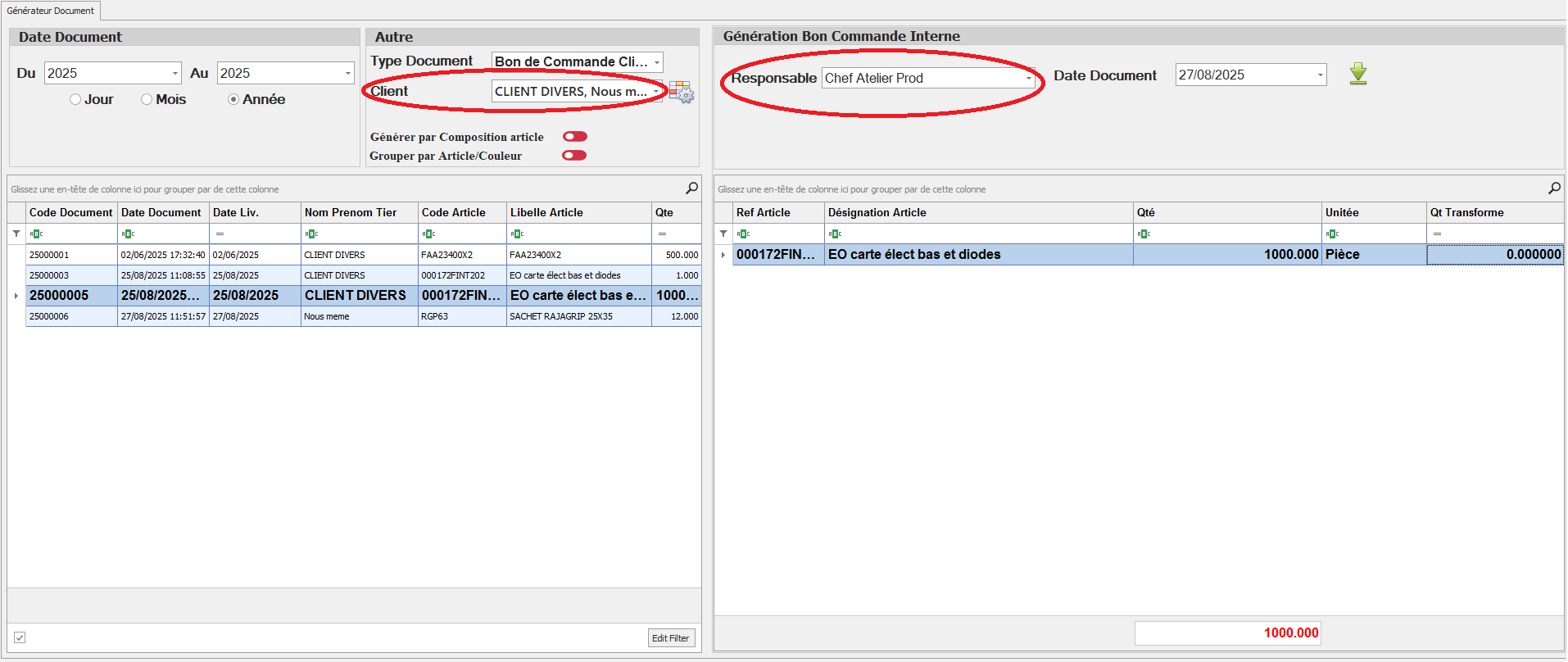
Le system présente la possibilité de générer un Bon de Commande production a partie des différents Bon de commande client .Ce document peut regrouper les ligne commande des différents clients d'un Même article dans une seul ligne. Cette fonctionnalité permet de lancer le calcul CBN de la Production d'un article Commandé par multi client. Généralement ce nouveau document est affecté ( tier document ) au chef Atelier production/ Responsable production

[![generateur document.PNG](https://help.asmpos.com/uploads/images/gallery/2025-08/scaled-1680-/tDmgenerateur-document.PNG)](https://help.asmpos.com/uploads/images/gallery/2025-08/tDmgenerateur-document.PNG)
##### **🔸 Description des champs** 

1. **Date Document**
    
    
    - Permet de définir une période (du … au …) avec un choix par **jour, mois ou année**.
2. **Autre**
    
    
    - **Type Document** : choix du type de document à générer.
    - **Client** : possibilité de rattacher le document à un client.
    - **Options** :
        
        
        - *Générer par Composition article* : active la génération la composition des articles.
        - *Grouper par Article/Couleur* : permet de fusionner les articles similaires (même référence, même couleur) dans un seul document.
3. **Tableau de gauche**
    
    
    - Affiche les documents sources avec leurs détails : date, code article, libellé, quantité, service, etc.
    - Sert à sélectionner les articles à regrouper.
4. **Génération Bon Commande Interne**
    
    
    - **Responsable** : désignation du responsable du document généré.
    - **Date Document** : date d’émission du nouveau document.
    - **Tableau de regroupement** : affiche la liste des articles consolidés (référence, désignation, couleur, quantité, surface, unité, etc.).

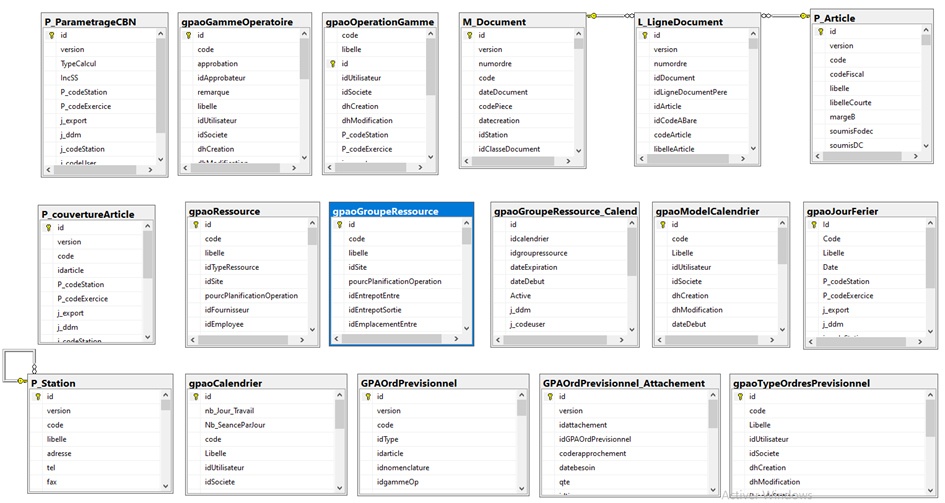
### <span style="color: rgb(0, 0, 0);">**5.Schéma relationnel de calcul CBN**</span>

[![image.png](https://help.asmpos.com/uploads/images/gallery/2025-06/scaled-1680-/hptimage.png)](https://help.asmpos.com/uploads/images/gallery/2025-06/hptimage.png)