# Propriétés

**<span style="font-size: 12.0pt; font-family: 'Times New Roman',serif; mso-fareast-font-family: 'Times New Roman'; mso-fareast-language: FR;">  
</span>**

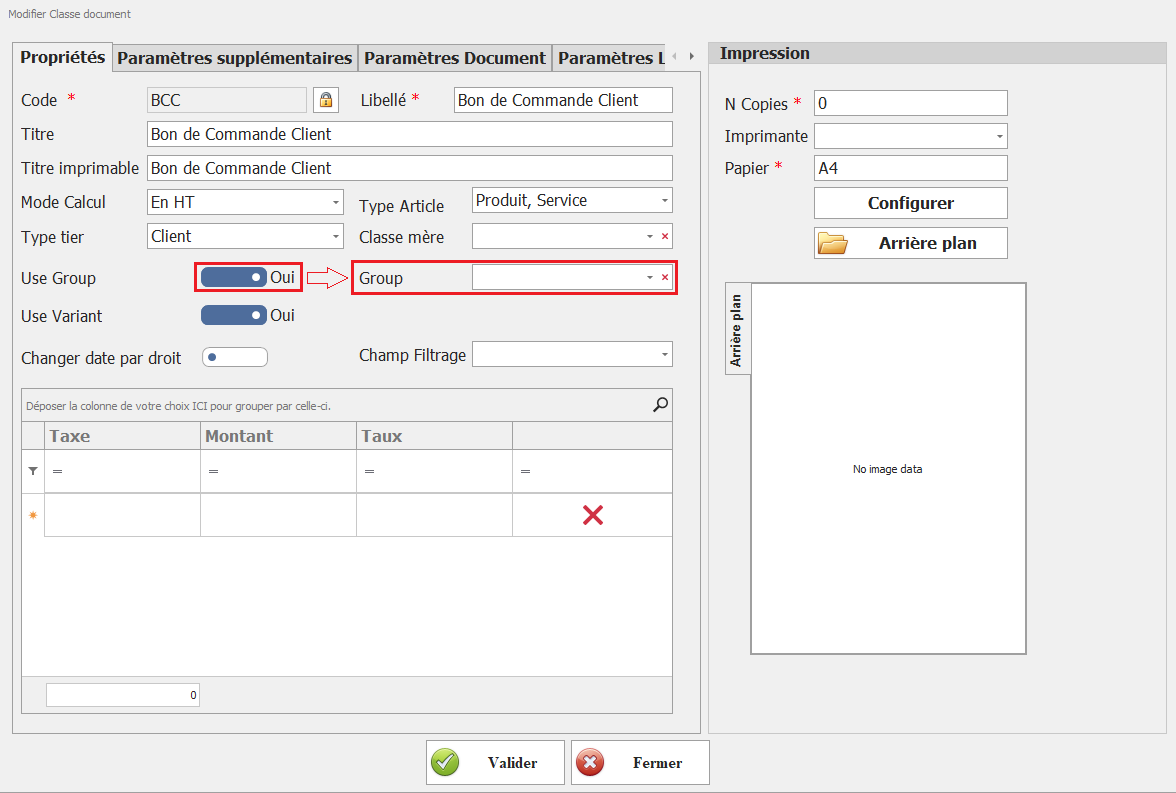
[![image.png](https://help.asmpos.com/uploads/images/gallery/2026-04/scaled-1680-/wTWimage.png)](https://help.asmpos.com/uploads/images/gallery/2026-04/wTWimage.png)

**<span style="font-size: 12.0pt; font-family: 'Times New Roman',serif; mso-fareast-font-family: 'Times New Roman'; mso-fareast-language: FR;">  
<span dir="auto" style="vertical-align: inherit;"><span dir="auto" style="vertical-align: inherit;">1- Code</span></span></span>**

<span style="font-size: 12.0pt; font-family: 'Times New Roman',serif; mso-fareast-font-family: 'Times New Roman'; mso-fareast-language: FR;"><span dir="auto" style="vertical-align: inherit;"><span dir="auto" style="vertical-align: inherit;">Champ unique permettant d'identifier la classe du document. Il s'agit d'un code alphanumérique défini par l'utilisateur, utilisé pour distinguer chaque type de document dans l'ERP.</span></span></span>

**<span style="font-size: 12.0pt; font-family: 'Times New Roman',serif; mso-fareast-font-family: 'Times New Roman'; mso-fareast-language: FR;"><span dir="auto" style="vertical-align: inherit;"><span dir="auto" style="vertical-align: inherit;">2- Libellé</span></span></span>**

<span style="font-size: 12.0pt; font-family: 'Times New Roman',serif; mso-fareast-font-family: 'Times New Roman'; mso-fareast-language: FR;"><span dir="auto" style="vertical-align: inherit;"><span dir="auto" style="vertical-align: inherit;">Nom de la classe de document. Ce champ permet de donner un titre clair et compréhensible à la classe, facilitant ainsi son identification dans les différentes interfaces du logiciel.</span></span></span>

**<span dir="auto" style="vertical-align: inherit;"><span dir="auto" style="vertical-align: inherit;">3- Titre </span></span>**

<span dir="auto" style="vertical-align: inherit;"><span dir="auto" style="vertical-align: inherit;">Titre associé à la classe de document, souvent utilisé pour des affichages internes dans l'ERP. Il peut être différent du libellé et peut servir à préciser davantage le rôle du document.</span></span>

**<span dir="auto" style="vertical-align: inherit;"><span dir="auto" style="vertical-align: inherit;">4- Titre Imprimable</span></span>**

<span dir="auto" style="vertical-align: inherit;"><span dir="auto" style="vertical-align: inherit;">Titre qui apparaîtra sur l'impression du document (exemple : Facture, Devis, Bon de Livraison). Ce champ permet de personnaliser l'affichage du titre sur les impressions officielles.</span></span>

**<span dir="auto" style="vertical-align: inherit;"><span dir="auto" style="vertical-align: inherit;">5- Mode de calcul</span></span>**

<span dir="auto" style="vertical-align: inherit;"><span dir="auto" style="vertical-align: inherit;">Champ sous forme de menu déroulant permettant de définir si les montants des documents sont exprimés </span></span><span style="text-decoration: underline;">*<span dir="auto" style="vertical-align: inherit;"><span dir="auto" style="vertical-align: inherit;">Hors Taxes (HT)</span></span>*</span><span dir="auto" style="vertical-align: inherit;"><span dir="auto" style="vertical-align: inherit;"> ou </span></span><span style="text-decoration: underline;">*<span dir="auto" style="vertical-align: inherit;"><span dir="auto" style="vertical-align: inherit;">Toutes Taxes Compris (TTC)</span></span>*</span><span dir="auto" style="vertical-align: inherit;"><span dir="auto" style="vertical-align: inherit;"> .</span></span>

- **<span dir="auto" style="vertical-align: inherit;"><span dir="auto" style="vertical-align: inherit;">HT</span></span>**<span dir="auto" style="vertical-align: inherit;"><span dir="auto" style="vertical-align: inherit;"> : Les montants sont enregistrés sans taxe, la TVA est ajoutée séparément.</span></span>
- **<span dir="auto" style="vertical-align: inherit;"><span dir="auto" style="vertical-align: inherit;">TTC</span></span>**<span dir="auto" style="vertical-align: inherit;"><span dir="auto" style="vertical-align: inherit;"> : Les montants incluent déjà la TVA.</span></span>

**<span dir="auto" style="vertical-align: inherit;"><span dir="auto" style="vertical-align: inherit;">6- Niveaux de type</span></span>**

<span dir="auto" style="vertical-align: inherit;"><span dir="auto" style="vertical-align: inherit;">Permet de définir à quel type de tiers (clients, fournisseurs, prospect…) s'applique cette classe de document. Ce paramètre influence les options et les règles applicables aux documents générés.</span></span>

<span style="color: rgb(0, 0, 0);">**<span dir="auto" style="vertical-align: inherit;"><span dir="auto" style="vertical-align: inherit;">7- code TTN :</span></span>**</span>

<span style="color: rgb(0, 0, 0);"><span dir="auto" style="vertical-align: inherit;"><span dir="auto" style="vertical-align: inherit;">champ réservé à l’utilisation dans le cadre de la facturation électronique</span></span></span>

**<span dir="auto" style="vertical-align: inherit;"><span dir="auto" style="vertical-align: inherit;"><span dir="auto" style="vertical-align: inherit;"><span dir="auto" style="vertical-align: inherit;">8-Type d'article</span></span></span></span>**

<span dir="auto" style="vertical-align: inherit;"><span dir="auto" style="vertical-align: inherit;">Définit les types d'articles qui peuvent être associés à cette classe de document (produits, services, matières premières, etc.). Ce paramètre permet de filtrer les articles lors de la création des documents.</span></span>

**<span dir="auto" style="vertical-align: inherit;"><span dir="auto" style="vertical-align: inherit;">9- classe Mère</span></span>**

<span dir="auto" style="vertical-align: inherit;"><span dir="auto" style="vertical-align: inherit;">Ce champ permet de lier une classe de document à une autre en tant que référence principale. Il est utilisé pour structurer les documents et établir une hiérarchie entre eux, facilitant ainsi la gestion des variantes et des déclinaisons de documents.</span></span>

**<span style="font-size: 12.0pt; font-family: 'Times New Roman',serif; mso-fareast-font-family: 'Times New Roman'; mso-fareast-language: FR;"><span dir="auto" style="vertical-align: inherit;"><span dir="auto" style="vertical-align: inherit;">Groupe d'utilisation</span></span>  
</span>**

<span dir="auto" style="vertical-align: inherit;"><span dir="auto" style="vertical-align: inherit;">Cette option permet d'activer ou de désactiver l'utilisation des groupes de niveaux pour ce document de classe. La sélection des groupes spécifiques se fait ensuite via l'option </span></span>**<span style="font-family: 'Calibri',sans-serif; mso-ascii-theme-font: minor-latin; mso-hansi-theme-font: minor-latin; mso-bidi-font-family: 'Times New Roman'; mso-bidi-theme-font: minor-bidi;"><span dir="auto" style="vertical-align: inherit;"><span dir="auto" style="vertical-align: inherit;">Groupe</span></span></span>**<span dir="auto" style="vertical-align: inherit;"><span dir="auto" style="vertical-align: inherit;"> .</span></span>

<span style="font-size: 12.0pt; font-family: 'Times New Roman',serif; mso-fareast-font-family: 'Times New Roman'; mso-fareast-language: FR; mso-no-proof: yes;">[![Utilisez groupe.PNG](https://help.asmpos.com/uploads/images/gallery/2024-08/scaled-1680-/use-groupe.PNG)](https://help.asmpos.com/uploads/images/gallery/2024-08/use-groupe.PNG)</span>

**<span style="font-size: 12.0pt; font-family: 'Times New Roman',serif; mso-fareast-font-family: 'Times New Roman'; mso-fareast-language: FR;"><span dir="auto" style="vertical-align: inherit;"><span dir="auto" style="vertical-align: inherit;">Groupe</span></span></span>**

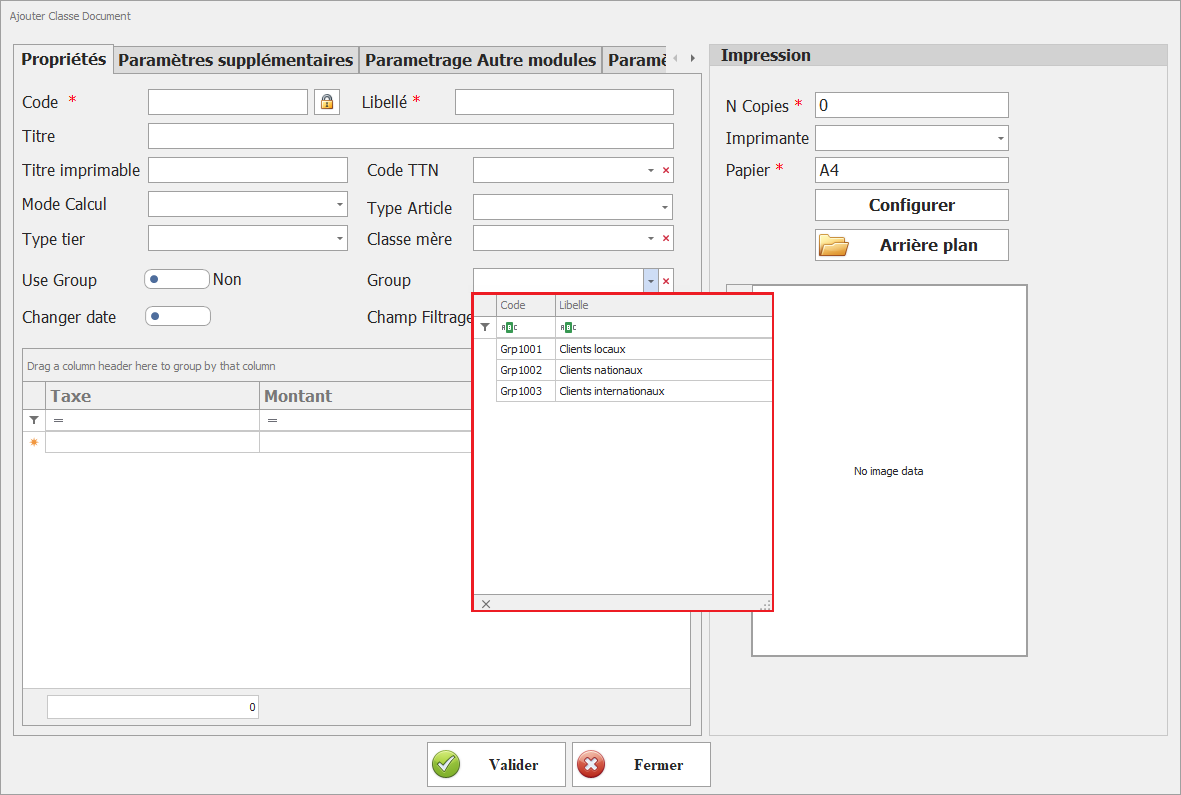
<span dir="auto" style="vertical-align: inherit;"><span dir="auto" style="vertical-align: inherit;">Spécifier quels groupes de niveaux peuvent être utilisés avec ce document de classe. Cela permet de contrôler les groupes de niveaux autorisés pour cette classe.</span></span>

[![image.png](https://help.asmpos.com/uploads/images/gallery/2026-04/scaled-1680-/2QKimage.png)](https://help.asmpos.com/uploads/images/gallery/2026-04/2QKimage.png)

<span style="font-size: 12.0pt; font-family: 'Times New Roman',serif; mso-fareast-font-family: 'Times New Roman'; mso-fareast-language: FR; mso-no-proof: yes;">  
</span>

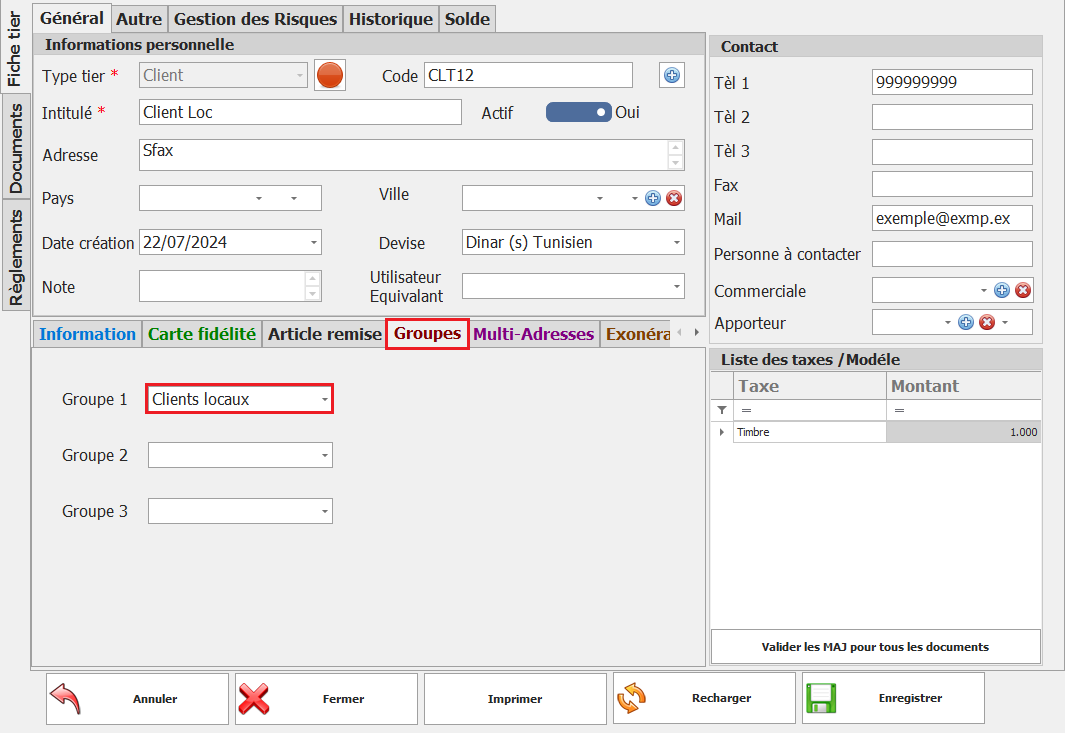
<span dir="auto" style="vertical-align: inherit;"><span dir="auto" style="vertical-align: inherit;">Pour attribuer des niveaux à des groupes, utilisez les options de gestion des groupes de niveaux dans la fiche niveaux.</span></span>

<span style="mso-no-proof: yes;">![assigner des niveaux à des groupes.PNG](https://help.asmpos.com/uploads/images/gallery/2024-08/assigner-des-tiers-a-des-groupes.PNG)</span>

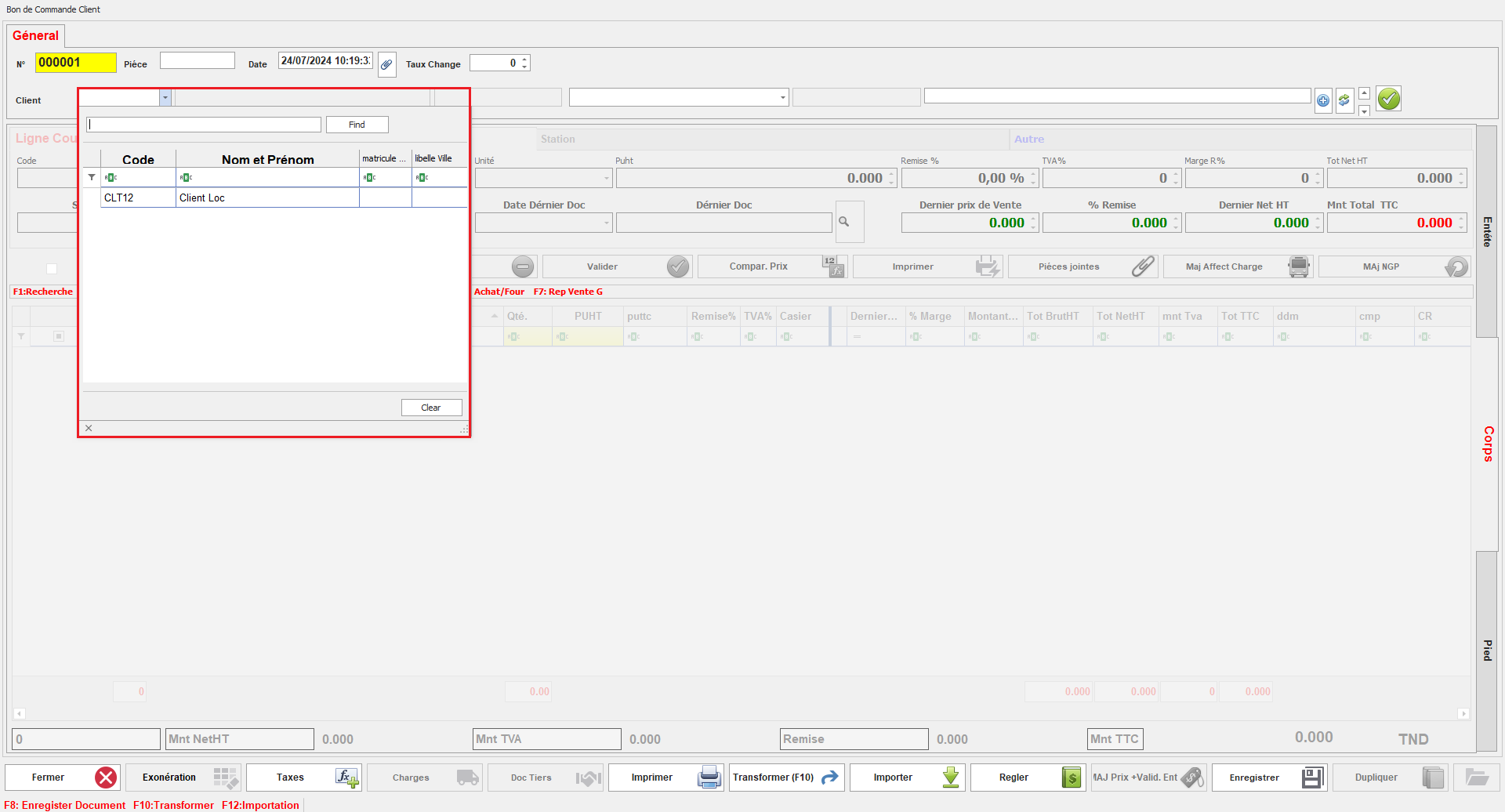
<span dir="auto" style="vertical-align: inherit;"><span dir="auto" style="vertical-align: inherit;">Une fois la classe document configurée, l'utilisateur pourra sélectionner des niveaux uniquement parmi ceux appartenant aux groupes sélectionnés pour cette classe document. Cela garantit que les niveaux disponibles pour chaque document sont limités aux groupes spécifiés, offrant ainsi un meilleur contrôle et une gestion plus cohérente.</span></span>

<span style="mso-no-proof: yes;">![niveaux dispo.png](https://help.asmpos.com/uploads/images/gallery/2024-08/tiers-dispo.png)</span>

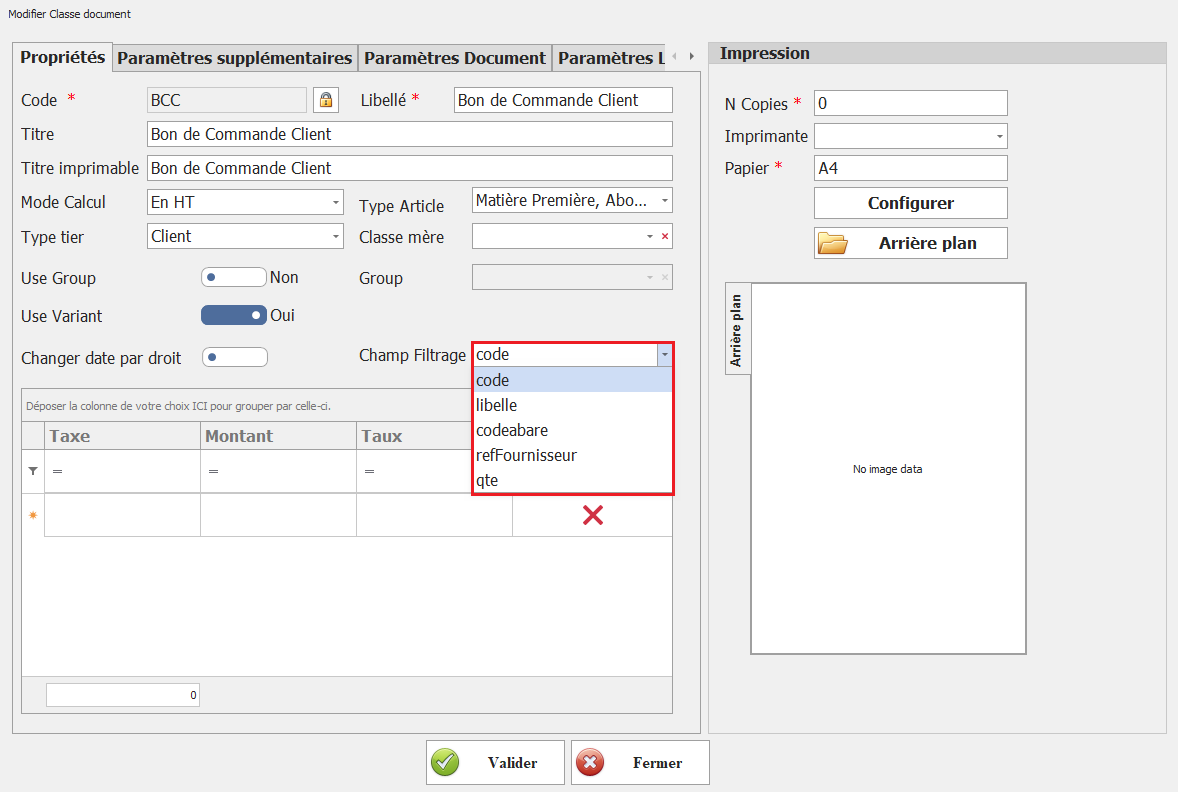
**<span style="font-size: 12.0pt; line-height: 107%; font-family: 'Times New Roman',serif; mso-fareast-font-family: 'Times New Roman'; mso-fareast-language: FR;"><span dir="auto" style="vertical-align: inherit;"><span dir="auto" style="vertical-align: inherit;">Champ Filtrage</span></span></span>**

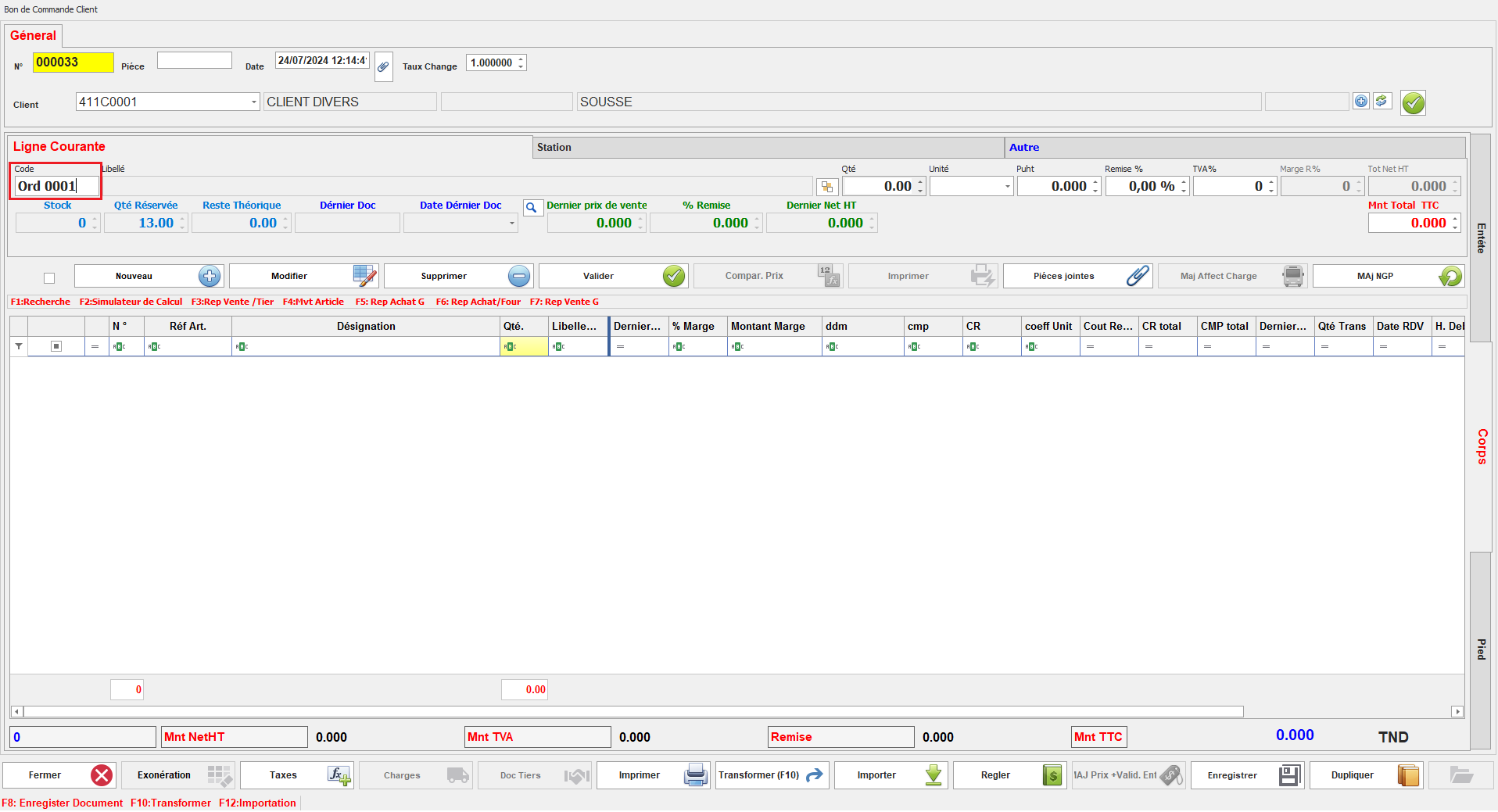
<span dir="auto" style="vertical-align: inherit;"><span dir="auto" style="vertical-align: inherit;">Définissez le champ sur lequel sera effectué la recherche dans cette classe document.</span></span>

**<span style="font-size: 12.0pt; line-height: 107%; font-family: 'Times New Roman',serif; mso-fareast-font-family: 'Times New Roman'; mso-fareast-language: FR; mso-no-proof: yes;">![filigrane de champ.png](https://help.asmpos.com/uploads/images/gallery/2024-08/champ-filgrage.png)</span>**

<span dir="auto" style="vertical-align: inherit;"><span dir="auto" style="vertical-align: inherit;">Ce paramètre détermine le critère utilisé pour filtrer les articles, permettant ainsi à l'utilisateur d'affiner les résultats de recherche selon le champ spécifié.</span></span>

**<span style="font-size: 12.0pt; line-height: 107%; font-family: 'Times New Roman',serif; mso-fareast-font-family: 'Times New Roman'; mso-fareast-language: FR; mso-no-proof: yes;">![Document de filtrage.PNG](https://help.asmpos.com/uploads/images/gallery/2024-08/filtrage-doc.PNG)</span>**